Ask any onboarding team where the days go and the answer is the same: waiting for the customer. A missing document, an ownership chart that stops one layer short, a question about where payments go. Each needs an email, a reply with attachments, someone to save them to the file, and someone to check whether they answer the question. Speeding that up is not about chasing harder. It is about asking once, precisely, and doing something with the answer the moment it arrives.
In short
- Agents draft, people send. When a check fails or something is missing, an agent prepares the request. It is held until an analyst reviews and sends it.
- One link, no login. The customer answers through a link that works only for that request. It is shown once; InsightKYC keeps only a fingerprint of it.
- Questions get a text box, documents get an upload. Each item on the request asks for exactly one thing.
- Answers are read on arrival. Uploaded PDFs are read into fields and every check runs again, so the analyst sees what the answer resolved.
The situation
The cases use InsightKYC’s demo data for Harbourline Bank, a fictional bank. Two business onboardings need something from the customer:
| Case | What is missing | Who noticed |
|---|---|---|
| KYC-2026-000004 Kestrel Freight LLC | The registry shows Olga Orlov owns 80% of Basalt Ventures Ltd, which owns 70% of the applicant: 56% effective. The application didn’t name her, and there is no identity document for her. | The ownership and verification agents |
| KYC-2026-000006 Summit Freight LLC | Ownership runs through holding companies; the funding account and the declared supplier countries need explaining. | The ownership and risk agents, then the analyst |
For Summit Freight the analyst writes the request by hand, one item per line:
- The register of members of each holding company between you and the people who own it
- A bank statement for the last 3 months showing the account that will fund the new account
- Why does the business pay suppliers in the countries listed on the application?
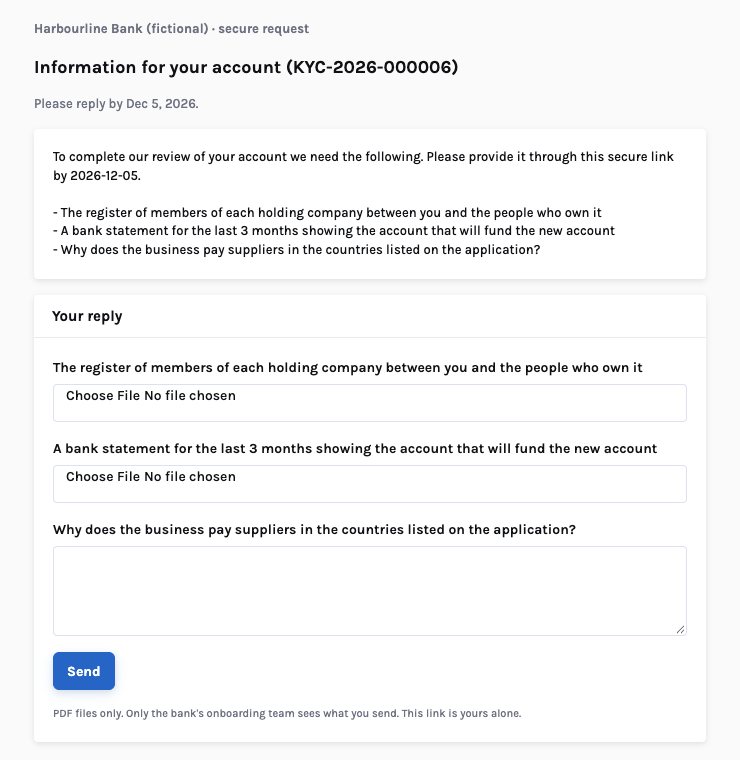
The first two ask for documents, so the customer gets an upload for each. The third is a question, so the customer gets a text box.
Why requests stall
- Vague asks. “Please provide ownership documents” produces the wrong documents. Every round trip adds days.
- Email as a filing system. Attachments arrive in an analyst’s inbox, get saved to a shared drive, and the case manager never knows they came.
- Nobody re-checks. The new passport arrives, but the expiry check that failed is still marked open until someone remembers to look.
- Security. Customers send identity documents by ordinary email because that is what the bank asked for.
The analyst writes from a template, the customer replies with attachments, the analyst files them and re-checks by hand, if they remember.
The request is drafted from what failed, held for review, sent with a one-time link, and the answer lands on the case where the checks run again.
How InsightKYC handles it
Nothing reaches the customer until an analyst presses Send.
Drafted and held
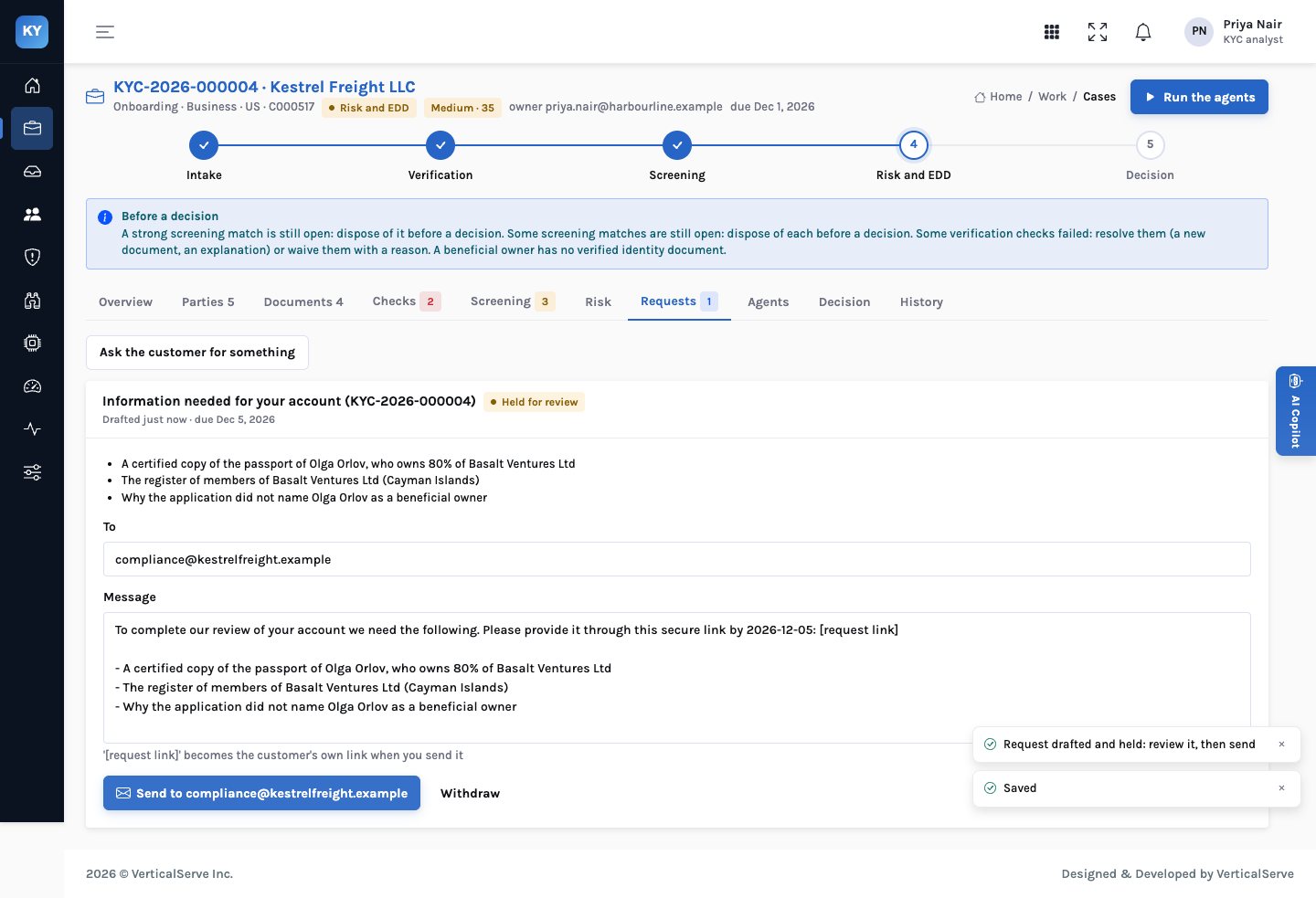
The intake, verification, ownership and EDD agents each prepare requests when they find a gap. A prepared request is a decision waiting on a person: accept, reject or ask. Accepting puts the request on the case’s Requests tab, held for review, with the message, the address and a reply-by date. The analyst can change any of them.
Sent once, with a link
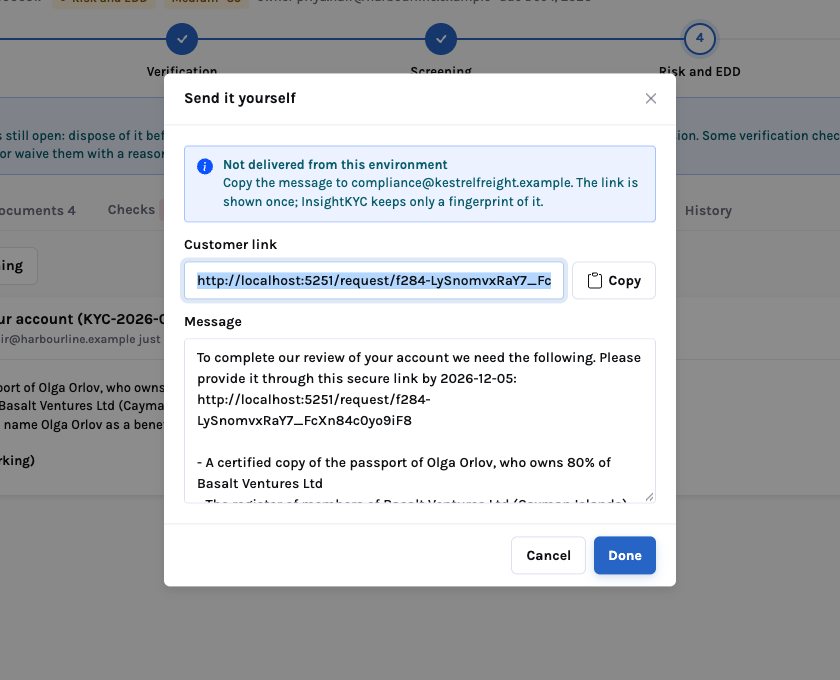
When the analyst sends, InsightKYC creates the customer’s link and puts it into the message where the placeholder was. The link is shown to the analyst once. InsightKYC stores only a fingerprint of it, so the link cannot be read back from the database. In the demo environment no email is delivered: the dialog shows the message and the link to copy, and says so plainly.
The customer’s page
The link opens a page outside the bank’s systems. It shows the message and one field per item: an upload for a document, a text box for a question. It shows nothing else about the case. When the customer sends, the request is marked answered and the link stops accepting new answers.
Read and checked on arrival
Each uploaded PDF becomes a document on the case, attached to the party the item was about. The reader turns it into fields with their lines quoted, and the checks run again. A new passport resolves the expiry check; a register of members gives the ownership agent the holders to compare with the registry. The analyst opens the case to see what the answer settled and what it didn’t.
Who does what
The agent never contacts the customer. The analyst sends; the answer comes back to the case.
Accept, reject or ask on each request the agents drafted. Rejected drafts are recorded with the reason.
One item per line. A line that asks something gets a text box; any other line asks for a file.
Check the address and the wording. The reply-by date is on the message.
A withdrawn request’s link stops working at once.
Through the link, without an account. PDF files only.
The uploads are on the case and the checks have run again. Resolve what remains.
The analyst’s choices
| Situation | Choice |
|---|---|
| The agent’s draft asks for too much | Edit the items before sending, or reject it with a reason and write a narrower one |
| The customer sent the wrong document | Send a follow-up request naming exactly what is needed |
| The answer raises a new concern | Work it on the case: a new owner, a screening match, a higher rating |
| The customer doesn’t reply | Withdraw and re-send, or escalate under the bank’s policy for unresponsive applicants |
What it means for each audience
For the CCO & MLRO
Every request the bank made, what it asked, when, who sent it and what came back is on the case. Identity documents arrive through a channel built for them, not ordinary email.
Agents never contact customers; people do.
For the KYC operations lead
Requests are drafted from what failed, so they are precise. Answers land on the case and re-run the checks, so nothing waits for someone to remember.
The Requests tab shows what is held, sent and answered.
For the board
Onboarding time is customer experience and revenue. Most of it is spent waiting. Asking once, precisely, is the cheapest way to shorten it.
It also keeps sensitive documents out of inboxes.
Metrics to track
What to be careful about
- Delivery is the bank’s. The demo doesn’t send email. A deployment uses the bank’s own mail service and sender domain, so customers recognise the message.
- Links are bearer tokens. Anyone with the link can answer. Keep reply-by dates short and withdraw requests that are no longer needed.
- Phishing. Customers are told not to click links in emails. Tell them how to recognise the bank’s request, and offer another channel.
- Tipping off. Requests made during a suspicious-activity investigation follow the bank’s procedure on what may be asked.
Most of onboarding is waiting. Ask once, precisely, and act on the answer the moment it arrives.
Let agents draft from what failed, let people decide what to send, and let the checks run again on what comes back.